What is AI video analytics?
· Updated · Slinai

Key facts
| What it is | Computer vision on CCTV that turns footage into counts, compliance checks, and verified alerts |
|---|---|
| Hardware | Existing IP/analog cameras and NVR/DVR over RTSP — no proprietary camera lock-in |
| Typical outputs | Footfall, queues, SOP/PPE, loss prevention, productivity, clip-backed WhatsApp/Slack/Teams alerts |
| Slinai accuracy (priority detections) | 99.25% on customer footage for priority detections; vision-language verification cuts false positives by about 25% vs rules-only stacks |
| Pilot time | Most pilots go live in 1–2 weeks: connect streams, calibrate zones, route alerts, UAT on your footage |
AI video analytics is software that reads camera footage the way an operations analyst would — then does it on every camera, every minute, without someone staring at a wall of screens.
It is not a new camera brand. It is not a promise that “AI will watch everything.” It is a set of measurable jobs: count people at a door, time a queue, confirm a hairnet is on, correlate a void with the register camera, or prove an after-hours door opened.
Slinai is an agentic AI video analytics platform built for that job on existing CCTV. This guide defines the category, shows what good implementations actually measure, and points to the live product, industries, and FAQ.

What AI video analytics actually measures
Traditional CCTV answers “what happened if we rewind.” Analytics answers “how often, how long, and who should act now.”
| Job | What the model looks at | Why ops care |
|---|---|---|
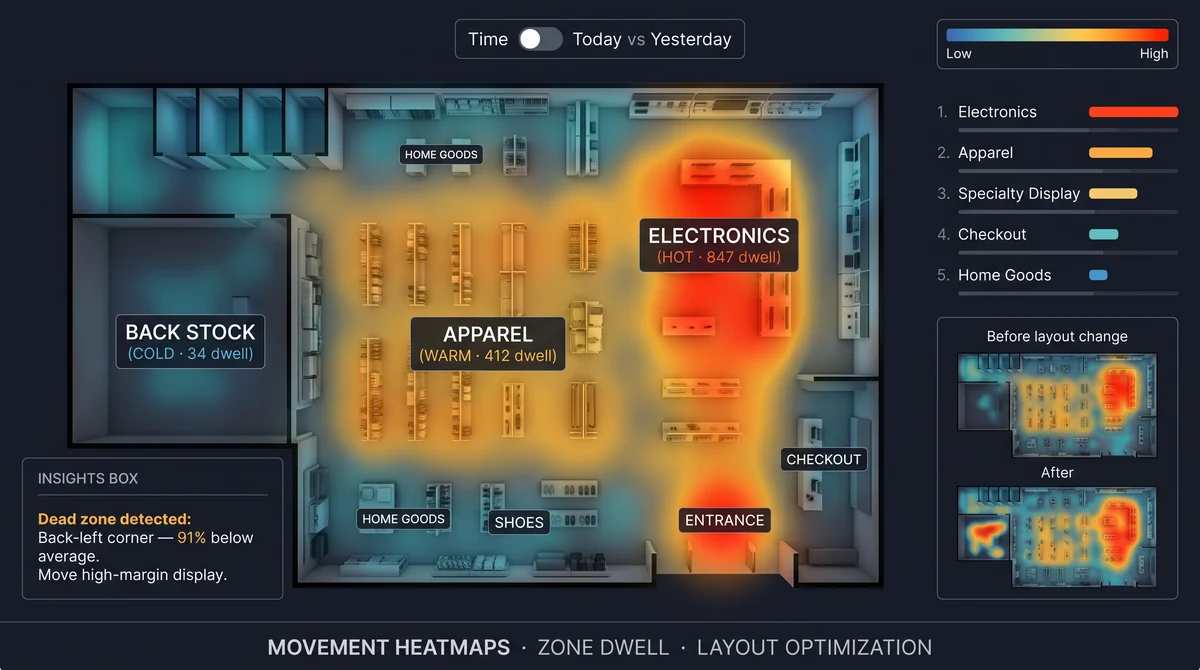
| Footfall & zones | Entries, direction, dwell, heatmaps | Staffing, merchandising, rent vs traffic |
| Conversion | Journey stages + POS | Where people leave without buying |
| Queues | Line length, wait, unmanned counters | Walkaways and SLA |
| Safety & SOP | PPE, restricted zones, kitchen hygiene | Audits that are not “inspection day only” |
| Loss & cash | Concealment, voids, no-sales, after hours | Shrink with clip evidence |
| Productivity | Pick/pack, dock TAT, line output | Throughput without extra sensors |
None of these require a shopper’s name. They require stable camera views, calibrated zones, and a place for the alert to land — WhatsApp for Indian store and warehouse teams is usually that place.
How AI video analytics works (without new cameras)
The pipeline is boring on purpose. That is why it scales.
- Ingest — RTSP (or equivalent) from the NVR/DVR or camera. Hikvision, CP Plus, Dahua, and other ONVIF devices are the default in India.
- Detect — models count people, objects, or behaviours in defined zones (entrance, queue, kitchen pass, dock).
- Verify — a vision-language step rejects obvious false positives (shadow, mop bucket, reflection) before a human is interrupted.
- Act — write a KPI, open an exception, or send a clip-backed alert.
- Ask — on an agentic platform, a manager can query yesterday’s longest queue or last night’s warehouse door in plain language.
Slinai’s Video AI module is the detection and agent layer. Cloud VMS is live view, playback, and camera hierarchy. Edge keeps processing on-site when bandwidth or residency requires it.
For a deployment-shaped walkthrough — NVR connect, hybrid, and data residency — read how AI video analytics works on existing CCTV.

What it is not
- Not a replacement for a guard or a store manager. It removes the need to watch every feed; people still decide and intervene.
- Not facial recognition by default. Behaviour and events are enough for footfall, queues, SOP, and most loss workflows.
- Not magic on a blind camera. A lens pointed at the ceiling, or a 2MP camera in a dark storeroom, will not become a forensic tool.
- Not “one model for every industry.” Retail conversion is not the same as dark-store pick-pack SLA or kitchen SOP. Playbooks matter.
If a vendor demo only shows pretty bounding boxes and no alert destination, false-positive story, or POS join, you are looking at a lab, not an operations product.
Where Indian teams use it first
The first win is almost never “AI strategy.” It is a painful weekly meeting.
- Retail chains start with footfall, conversion, queues, or loss prevention. See the full retail video analytics hub.
- Restaurants and QSR start with host/takeaway queues and kitchen SOP — restaurant video analytics.
- Quick commerce starts with pick-to-dispatch time — dark store video analytics.
- Plants and warehouses start with PPE zones, dock TAT, and after-hours doors.
Use-case pages live under solutions if you already know the job (loss prevention, service SLA, safety) rather than the industry.

Alerts that people will actually open
A detection that dies in a dashboard is a report, not a system.
Slinai verifies events and sends clip-backed notifications to WhatsApp, Slack, or Teams — typically in under 30 seconds after confirmation. That is the difference between “we have analytics” and “the duty manager opened counter 4.”
Accuracy claims should be on your footage, not a brochure. Slinai benchmarks 99.25% on priority detections (footfall, queue, SOP, loss) on customer footage, with verification that cuts false positives by about 25% versus rules-only stacks. Treat those as starting points for a pilot UAT, not a guarantee for every camera angle.

How to evaluate a platform (short version)
Use the longer India buyer’s guide when you are in an RFP. The short list:
- Works on existing CCTV (ONVIF/RTSP), documented security and residency options.
- Detections match your jobs — not a generic “smart city” reel.
- Alerts are verified and land where staff already work.
- You can join POS / OMS / workforce when the question is conversion or cash (data & integrations).
- You can compare TCO honestly on pricing and compare.
Then book a demo on your own streams. That is the only accuracy that matters.
Next reads
- What is agentic AI video analytics? — questions, standing agents, clip-backed action.
- How AI video analytics works on existing CCTV — NVR, edge, cloud, hybrid.
- FAQ — cameras, accuracy, languages, pilots.
- Product — Cloud VMS, Video AI, edge, data, alarms.
Common questions
Is AI video analytics the same as watching CCTV?
No. Watching CCTV is human attention on a live wall. AI video analytics measures events automatically — counts, wait times, SOP misses, intrusion — and only escalates when something needs a person.
Do I need new cameras for AI video analytics?
Usually no. Platforms like Slinai connect to existing IP or analog cameras and NVRs over RTSP (Hikvision, CP Plus, Dahua, or any ONVIF device). New cameras help only if coverage or image quality is already poor.
What can AI video analytics measure in a store or site?
Typical detections include footfall and zone heatmaps, conversion funnels with POS, queue and wait times, PPE and kitchen SOP, pick-pack productivity, and loss or after-hours intrusion — depending on camera placement.
How is this different from a VMS?
A VMS records, plays back, and organises cameras. Video AI adds detections and alerts on top. Most teams use both: Cloud VMS for live view and search, Video AI for the operational numbers and WhatsApp alerts.
Is facial recognition required?
No. Slinai analyses behaviour and events, not biometric identity. Demographics, when used, are aggregate bands. Facial recognition is off by default.
Related pages
Guides in this cluster point to live product, industry and use-case pages.
Related guides
Restaurant queue management: host stand to takeaway
Restaurant queue management on existing CCTV: time host-stand parties, billing and takeaway counter waits, and catch walkaways before guests leave.
Cold storage ingredient compliance in cloud kitchens
Cloud kitchen cold-storage analytics flags door-open dwell and ingredient pulls that sit in the warm aisle — process evidence beside a logger, not a replacement for it.
Cloud kitchen complaint forensics from KOT timestamps
Cloud kitchen complaint forensics ties a refunded order ID to the right prep-camera window using KOT and POS timestamps, not bag logos.