The right alert, on the right channel
Store managers live on WhatsApp. HQ ops prefers Slack. After-hours duty needs SMS when bandwidth is low. Slinai delivers the same verified clip everywhere your teams already respond.
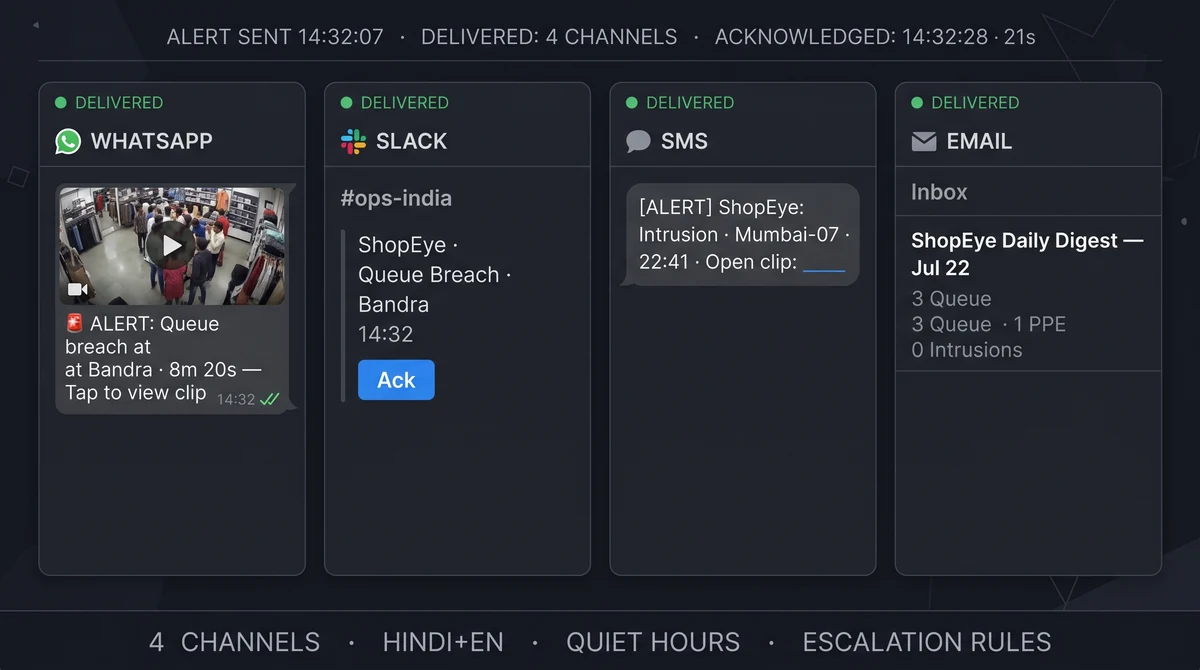
Which alert channels does Slinai support?
Slinai supports WhatsApp, Slack, SMS, and email out of the box. Each alert includes event type, site, timestamp, and a clip thumbnail with a secure link to full playback. Admins configure routes per detection type, site, and shift — including escalation rules and quiet hours.
What Alert channels delivers
WhatsApp for field teams
Instant clip links to store managers and regional security — the channel Indian teams answer fastest.
Slack for central ops
Structured alert threads for HQ analysts with acknowledgement buttons and incident notes.
SMS & email fallback
After-hours SMS when data is limited; email digests for compliance archives and audit trails.
Quiet hours & escalation
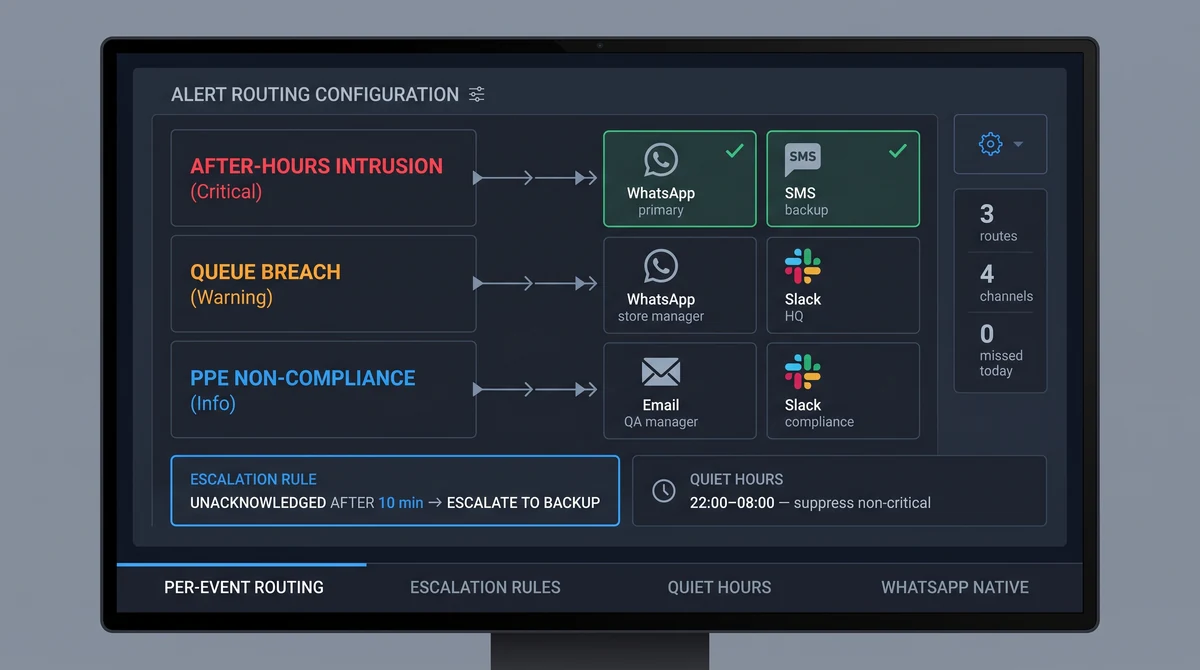
Suppress non-critical detections overnight while keeping after-hours intrusion active; escalate unacknowledged events.
Alert history & digest
Searchable alert log with filters for site, event type, channel, and acknowledgement status.
In-platform notification hub
Browser notification centre for HQ analytics roles reviewing dashboards — no external channel required.
Clips attached — not alert fatigue
Raw motion alerts flood phones and get muted. Slinai sends AI-filtered events with a short clip so recipients verify in seconds before calling someone in or dispatching security.
For after-hours intrusion, pair with Video alarms: your security team self-verifies via clip link. Slinai is not a professional monitoring station and does not dispatch armed response.
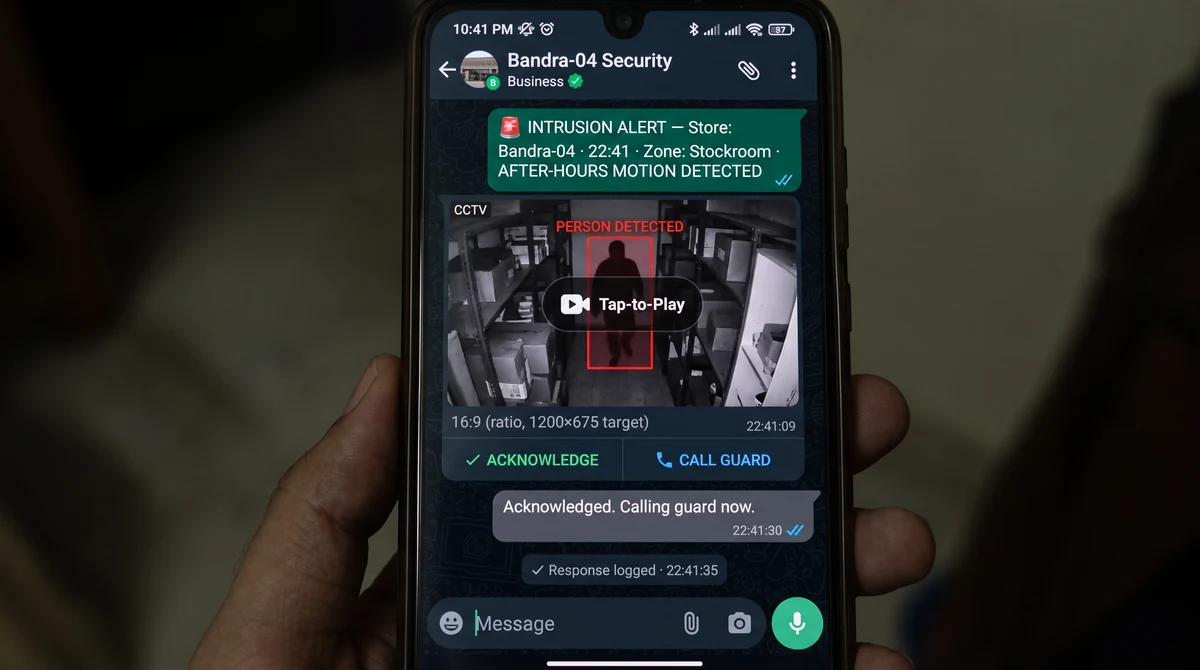
Who gets the alert — and who gets the follow-up
Every detection type can have its own routing rule. Queue alerts go to the floor supervisor; after-hours intrusion goes to security; PPE non-compliance goes to the QA manager and regional head. Slinai escalates unacknowledged critical alerts to backup contacts after a configurable window.
Pair with Video alarms for after-hours rules, and API & webhooks to forward events into your incident management system automatically.
Explore further
Industries served, use case playbooks, and platform modules that connect with Alert channels.
Where teams use this
Outcome playbooks
Works best with
See Alert channels on your cameras
Tell us about your sites and we'll show what Slinai surfaces on the CCTV you already own.
Common questions
Can different sites use different channels?
Yes. Per-site and per-event-type routing — e.g. queue alerts to Slack, intrusion to WhatsApp + SMS.
Are WhatsApp messages end-to-end encrypted?
Delivery uses WhatsApp Business APIs; clip links require authenticated Slinai access. See Security & privacy for data handling details.
How do we reduce false alerts?
Tune detection zones and use AI-filtered alert rules in Video alarms before messages leave the platform — filtering happens before routing.
Can we set business hours for alerts?
Yes. Per-event quiet hours suppress non-critical notifications overnight while keeping after-hours intrusion active.
Can multiple sites route to one WhatsApp group?
Yes. Regional groups receive consolidated alerts per detection type; per-site routing prevents HQ being flooded with every individual event.
Talk to us — or see it live
Tell us about your sites and goals, and we'll show you exactly what Slinai surfaces on your existing cameras.
Book a live demo
A focused 30-minute session, tailored to your operation.
- Live walkthrough on footage like yours
- Your top use-cases mapped to detections
- Deployment plan for your cameras & sites
- Indicative pricing and ROI estimate
Or reach us directly