Retail footfall analytics: how stores count visitors
· Updated · Slinai

Key facts
| What it counts | Entries, exits, direction, zone traffic, dwell — not just a door-beam total |
|---|---|
| Hardware | Existing store CCTV; infrared beam counters are optional to retire |
| Accuracy target | 98%+ people counting on calibrated entrance/overhead views (Slinai retail deployments) |
| First use | Hourly staffing, promo lift vs baseline, like-for-like store benchmarks |
| Hub | Retail video analytics industry page — footfall is one module next to conversion, queues, and loss |
Retail footfall analytics is the discipline of counting visitors well enough to change a roster or a planogram — not the sport of publishing a vanity “walk-ins” tile.
Beam-break and thermal door counters were built for a single number at a threshold. They struggle with groups, overlapping bodies, and staff ducking the beam. AI people counting on existing CCTV sees the same door the manager already films for shrink, then adds zones and dwell.
This guide goes deeper than the retail video analytics hub: methods, failure modes, and how footfall feeds conversion and queues. Slinai implements this in Video AI and operations & productivity.
How stores used to count (and why it lies)
| Method | What it gets right | How it fails |
|---|---|---|
| Infrared beam | Cheap, simple total | Groups, prams, staff, two people abreast |
| Thermal overhead | Better in some doors | Cost per door; still weak on in-store pathing |
| Manual clicker | Honest for a 20-minute audit | Does not scale to 80 stores × 14 hours |
| Wi-Fi / phone pings | Rough dwell | Misses people with phones off; privacy optics |
| CCTV + AI | Same cameras you already pay for | Needs a usable view and staff exclusion |
The industry page is right that 98%+ counting is the bar for a calibrated AI view. Treat that as a UAT target on your door, not a number to print before the camera is aimed.
What to measure besides “heads in”
A useful footfall stack has four layers:
- Store entries — unique visits per hour (not frame-by-frame blobs).
- Direction — in vs out, so you do not treat a fire-exit flow as traffic.
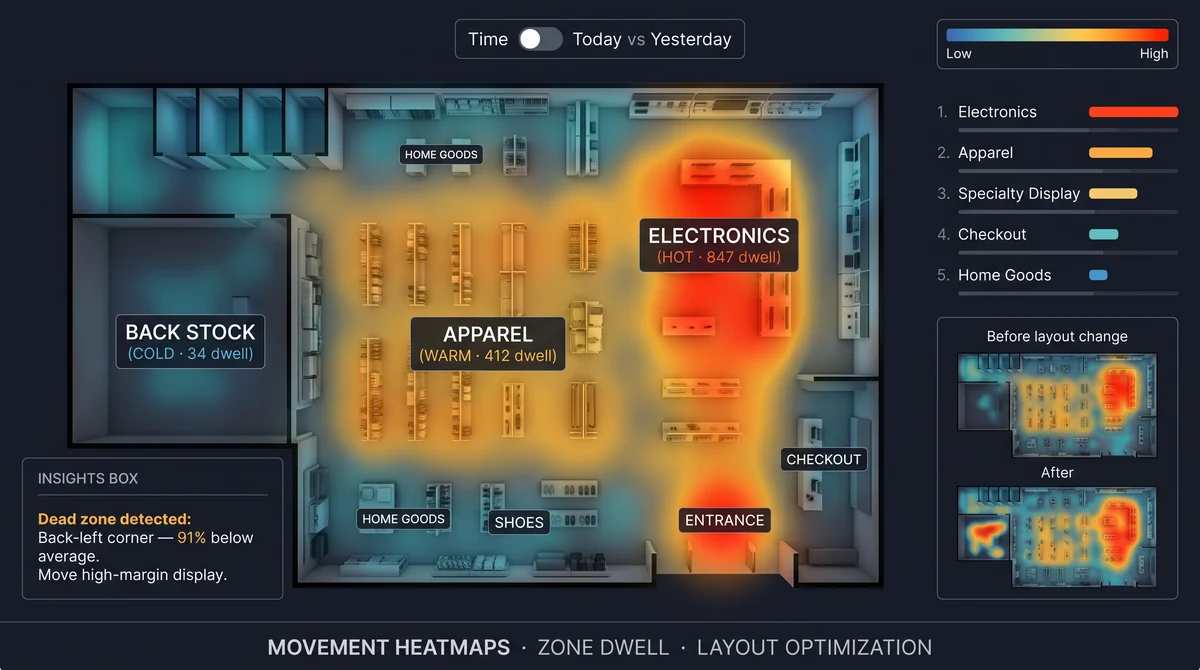
- Zone occupancy & dwell — who reached apparel vs who bounced from the power aisle.
- Outside context — weather, local holiday, mall vs high-street (even a simple flag beats a mysterious Tuesday dip).
Then you do not stop at traffic. Traffic without conversion is a weather report. Traffic without queue data misses the people who entered, shopped, and left angry at billing.
Camera placement that makes counting honest
- Prefer overhead or high entrance, looking down the threshold — not a side CCTV meant for face-on POS fraud.
- Avoid backlight from an open shutter; expose for people, not the street.
- Draw the line inside the air curtain so street traffic does not count.
- Staff door as a separate zone or a suppressed line.
- One story per camera — do not ask one dome to count the door and the entire grocery floor.
If the only “entrance camera” is a 2MP unit in a vestibule full of reflections, fix the view before you argue model brands.
Multi-store benchmarking without lying to yourself
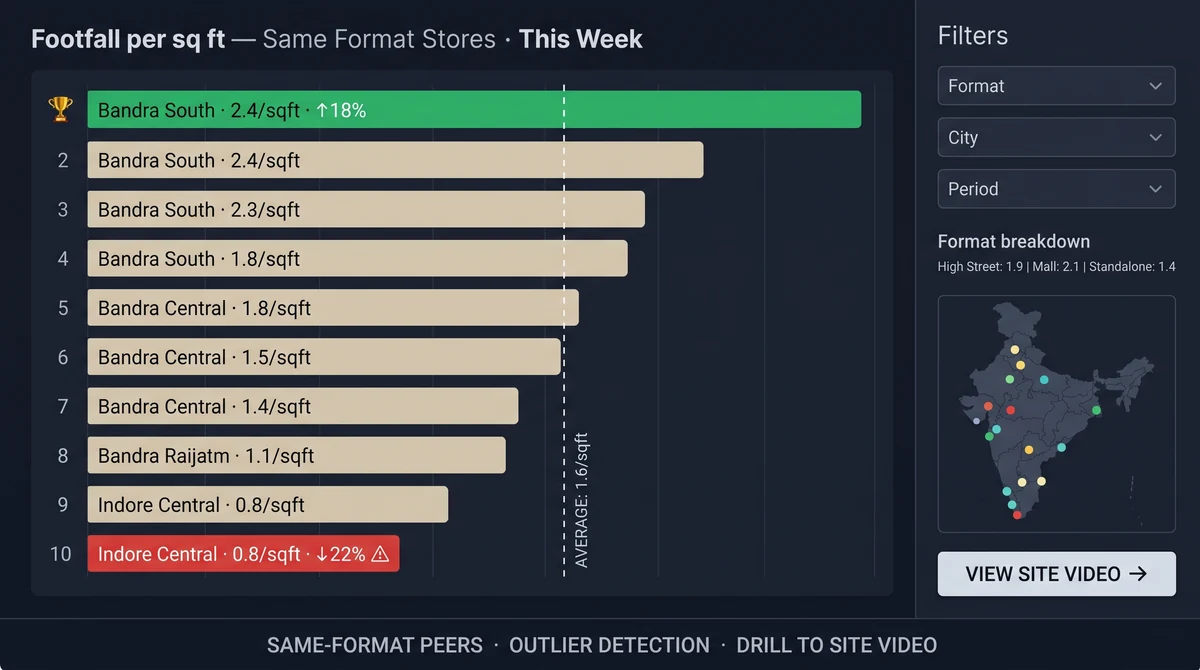
Slinai’s footfall benchmark style view only helps if HQ agrees the denominator.
- Same format (express vs supermarket).
- Same trading hours (late-night stores will “win” raw volume).
- Prefer visits per sq ft or visits per labour hour over raw rank.
- Call out mall events and road works in the weekly note or the chart will invent a mystery.

Promo measurement: lift vs the week before
The question is not “did the endcap look good.” It is did this door get more visits than the same weekday baseline, and did they reach the promo zone?
Method:
- Lock a 4-week baseline for that weekday.
- Run the promo; watch entry lift and promo-zone dwell.
- Join POS in the conversion funnel so you see billed, not just curious.
Without zone dwell, a busy street and a successful promo look the same at the door.
How this ties to Slinai
- Industry playbook: retail video analytics.
- Labour and throughput: operations & productivity.
- Detections and agentic questions (“which store was quiet at 4 pm?”): Video AI and agentic analytics.
- Next problems in the same cluster: queues, loss prevention.
Book a demo on an entrance you already record. Bring last Saturday’s roster if you want the conversation to be about rupees, not bounding boxes.
Common questions
Is CCTV footfall as accurate as a door sensor?
Well-aimed overhead or entrance cameras typically outperform beam-break sensors on groups, trolleys, and two-way traffic. Slinai targets 98%+ counting accuracy on calibrated views. Sideways, distant, or backlit doors still need a camera move — not a new sensor brand.
Does footfall include staff?
You should exclude staff with a staff-door zone, uniform/heuristic rules, or a known entrance. A raw headcount that mixes employees with shoppers will lie to labour planning.
Can I compare stores with different formats?
Compare like-for-like: same format, similar selling area, same hours. Footfall per square foot and conversion (see the conversion guide) are fairer than raw heads across a hypermarket and a 800 sq ft express store.
Do I need a camera on every aisle?
Not on day one. Entrance plus two or three priority zones (promo, fitting, high-shrink) is enough to change staffing and VM. Add aisles when a category owner will actually use the heatmap.
How does this help labour cost?
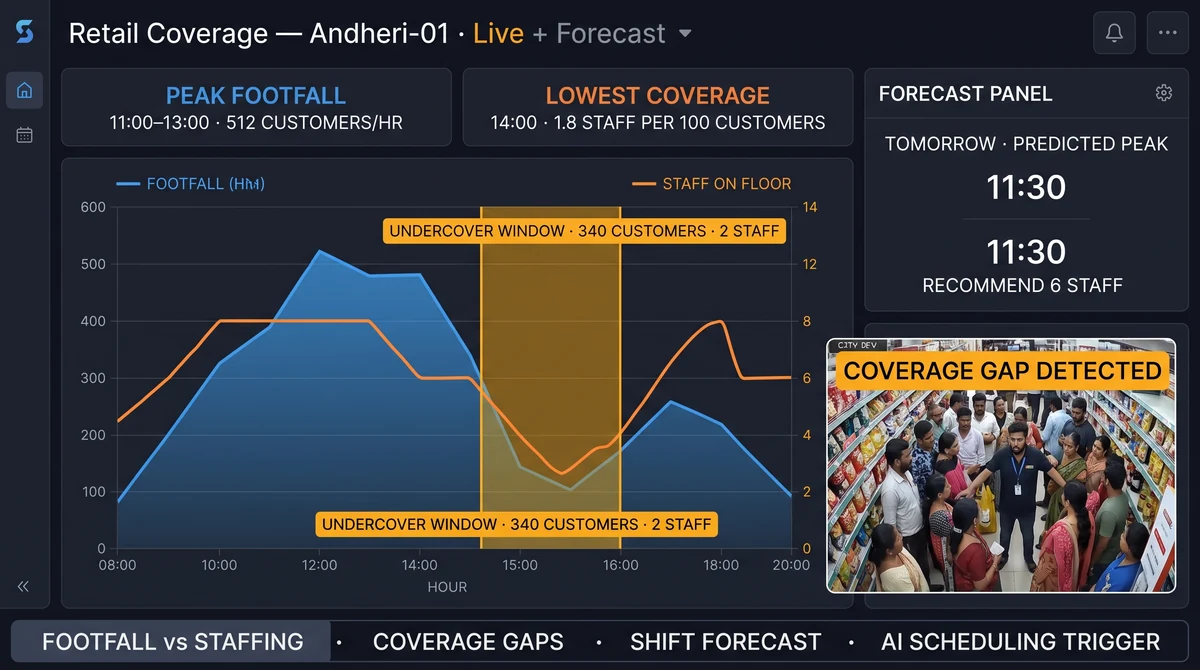
You staff to traffic shape — not to last year’s roster. Industry practice is to overlay hourly footfall on roster hours; Slinai’s operations view is built for that conversation.
Related pages
Guides in this cluster point to live product, industry and use-case pages.
Related guides
Retail conversion funnel: visitors to billed
Retail conversion funnel analytics maps visitors to billed on CCTV plus POS. Find drop-off by zone, hour and store — not sales guesswork.
Retail loss prevention AI on existing cameras
Retail loss prevention AI flags concealment, cashier fraud and after-hours intrusion on the CCTV you already own — with clip proof for review.
Retail queue analytics and checkout wait time
Retail queue analytics measures checkout wait time on existing cameras and alerts managers before lines drive walkaways and abandoned baskets.