One cloud layer for every camera, every location
Unify live video, historical playback, and operational analytics on the IP cameras and recorders you already own. No rip-and-replace — connect via RTSP/ONVIF and manage hundreds of sites from one dashboard.
What is Slinai Cloud VMS?
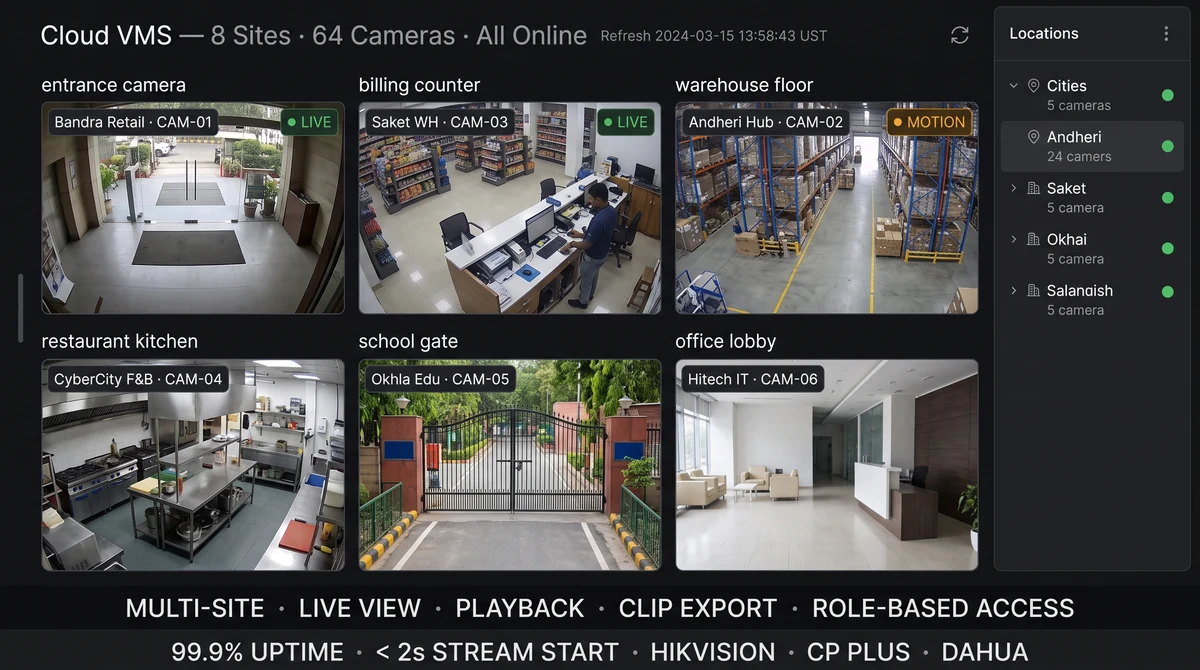
Slinai Cloud VMS is a cloud-based video management and analytics layer that connects to your existing IP cameras, NVRs, and DVRs. It provides multi-site live viewing, time-synced playback, clip search and export, role-based access, and the foundation for AI detections — without replacing hardware.
Explore Cloud VMS for multi-site operations
Each module runs on the cameras you already own — start with one, add others as you scale.
Platform walkthrough video
Add a 90-second product tour here (live multi-site view → playback → clip export).
What Cloud VMS for multi-site operations delivers
Unified multi-site hierarchy
Organise cameras by region, city, site, and zone. Area managers see only their scope; HQ sees everything.
Live view from any device
Secure browser and mobile access to live feeds — no VPN client installs for field teams.
Role-based video access
Granular permissions per role, site, and camera group with full audit logs for compliance reviews.
Time-synced playback
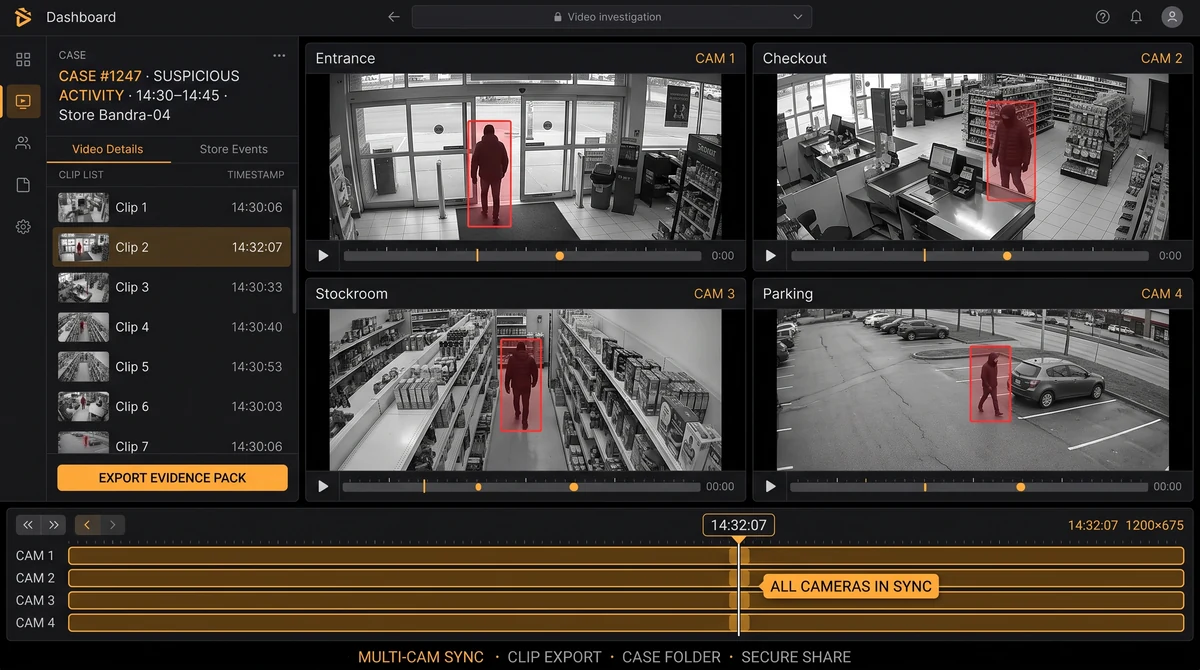
Scrub incident timelines with frame-accurate playback across multiple cameras simultaneously.
Clip save & share
Export timestamped clips for investigations, insurer claims, or law enforcement — internally or via secure links.
Retention policies
Configurable cloud retention per site tier — align storage cost with regulatory and operational needs.
From connect to insight
Connect recorders & cameras
Point Slinai at your NVR/DVR or direct RTSP streams — Hikvision, CP Plus, Dahua, Axis, ONVIF.
Map your site hierarchy
Group cameras by floor, zone, and function so teams find the right feed in seconds.
Enable AI detections
Layer footfall, queue, safety, and security analytics on the same video pipes.
Alert & act
Route verified events to WhatsApp, Slack, or email with clip evidence attached.
See every site without travelling to every site
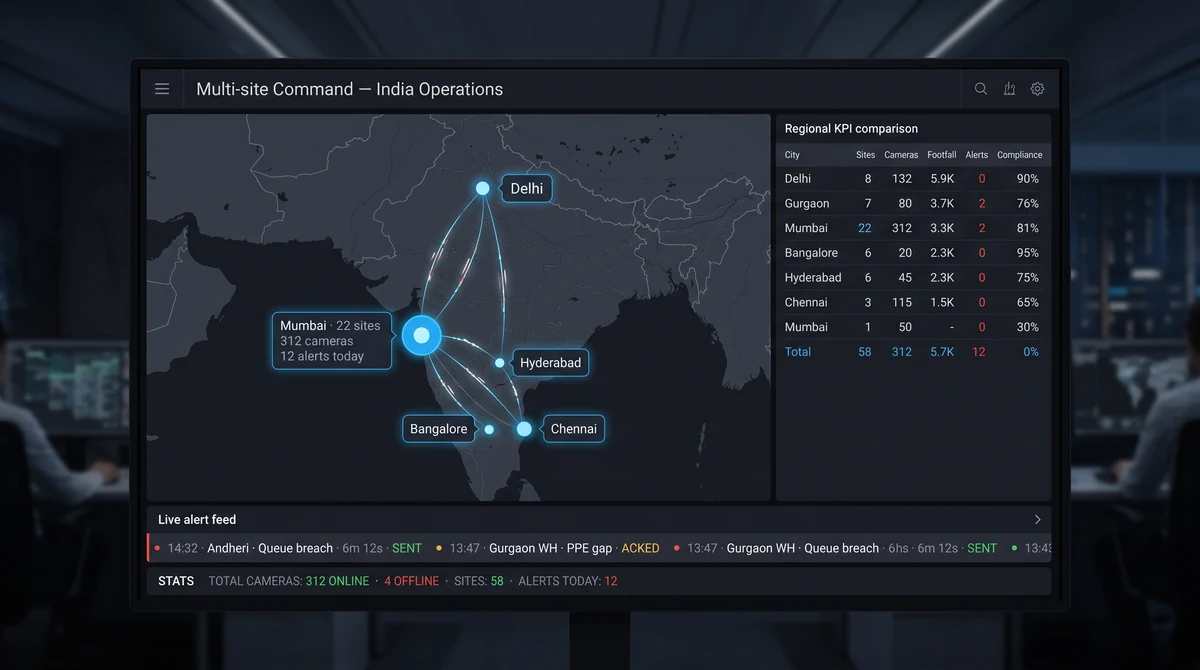
Regional and HQ teams lose days each month visiting locations to verify incidents, audits, or opening routines. A cloud VMS puts every camera one click away — live or historical — so managers validate what happened before dispatching someone on-site.
Slinai is built for Indian multi-site operators: retail chains, warehouse networks, cloud-kitchen hubs, and campus portfolios where camera brands differ by era but all speak RTSP.
Find the moment — not the hour
Traditional NVR review means watching hours of footage. Slinai adds motion bookmarks, zone filters, and AI-tagged events so investigators jump straight to the relevant segment and export a clip in minutes.
Pair playback with POS or access-control timestamps when integrations are enabled — see the transaction and the camera angle together.
Explore further
Industries served, use case playbooks, and platform modules that connect with Cloud VMS for multi-site operations.
Where teams use this
Outcome playbooks
See Cloud VMS for multi-site operations on your cameras
Tell us about your sites and we'll show what Slinai surfaces on the CCTV you already own.
Common questions
Does Slinai replace my existing NVR?
No. Slinai connects to your existing NVR, DVR, or IP cameras. You keep current hardware; Slinai adds cloud access, analytics, and alerting on top.
Which camera brands are supported?
Any device with RTSP or ONVIF — including Hikvision, CP Plus, Dahua, Axis, Bosch, Hanwha, and generic ONVIF NVRs.
Can video stay on-premise?
Yes. Edge & on-prem deployments keep video processing inside your network while still feeding dashboards and alerts via optional hybrid sync. See Edge & on-prem and Security & privacy for residency options.
How many sites can one account manage?
Hundreds of locations in a single tenant with regional grouping, delegated admin roles, and per-site retention policies.
Talk to us — or see it live
Tell us about your sites and goals, and we'll show you exactly what Slinai surfaces on your existing cameras.
Book a live demo
A focused 30-minute session, tailored to your operation.
- Live walkthrough on footage like yours
- Your top use-cases mapped to detections
- Deployment plan for your cameras & sites
- Indicative pricing and ROI estimate
Or reach us directly