What is agentic AI video analytics?
· Updated · Slinai

Key facts
| Definition | Video analytics plus standing agents that answer questions and act on events with clip evidence |
|---|---|
| Versus dashboards | Dashboards are pull; agents are push + Q&A grounded in your cameras |
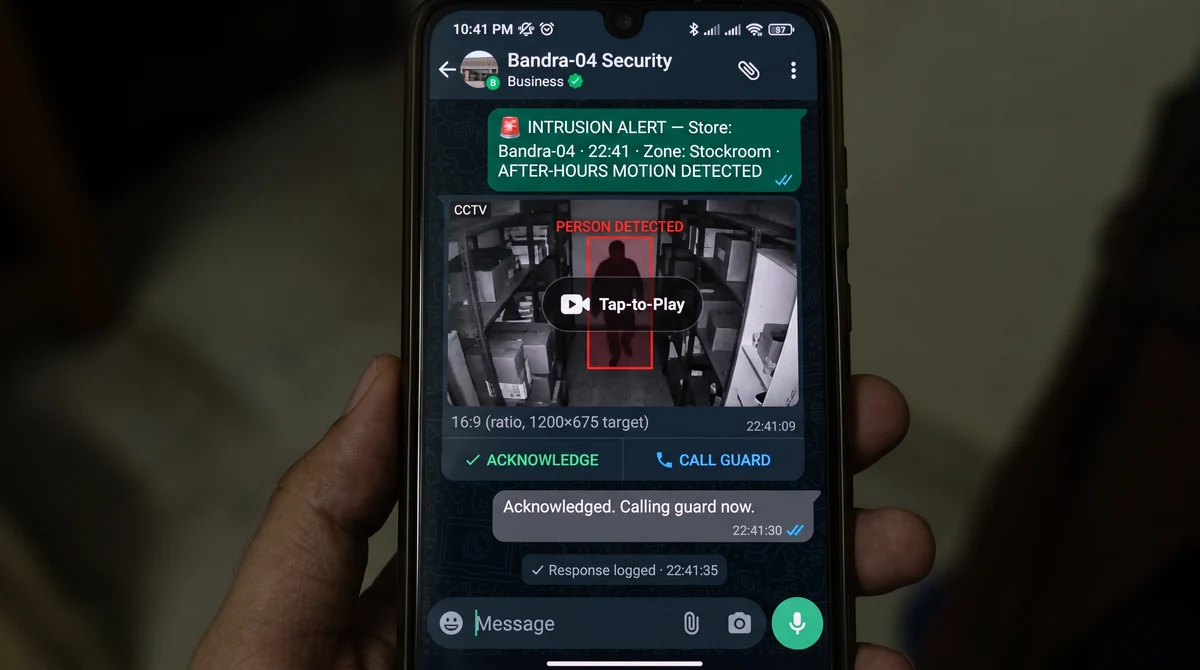
| Alert path | Verified clips to WhatsApp, Slack, or Teams — typically under 30 seconds after confirmation |
| Languages | English and Hindi for queries and operational alerts on Slinai |
| Prerequisite | Working detections on existing CCTV — agents do not replace camera coverage or zone setup |
Agentic AI video analytics is AI video analytics with a working layer on top: you can ask, delegate, and get interrupted only when it matters.
The word “agentic” is overloaded. In this product category it does not mean a robot walking the aisle. It means software that:
- Accepts a job in plain language (“alert me if the jewellery bay is empty during peak”).
- Watches the relevant cameras without being re-opened.
- Grounds every answer and alert in a clip or a counted event.
- Routes that proof to the person on duty.
Slinai is built as that stack on existing CCTV. The product combines Cloud VMS, Video AI, and alerts. Use cases describe the jobs; this post describes the interaction model.

Dashboards vs agents vs “rules only”
| Approach | What you do | What breaks |
|---|---|---|
| Rules-only CCTV analytics | Set tripwires and line-cross | Noise. Shadows, bags, and cleaning staff fire all night. |
| Dashboard analytics | Open a portal, filter dates, export CSV | Nobody opens it on Saturday evening. |
| Agentic analytics | Ask once, set a standing watch, get a verified clip | Only as good as detections + routing. Bad zones still fail. |
Rules are still required. An agent that cannot count a queue cannot answer “which store waited longest.” The upgrade is verification + language + delivery.
Slinai uses a vision-language check to cut false positives by about 25% versus rules-only stacks on priority detections, then lets you query in English or Hindi. That pairing is the product, not the buzzword.
What you can ask (and what you should not)
Good questions are site-scoped and time-scoped:
- “Which store had the longest checkout queue yesterday?”
- “Show after-hours motion at Warehouse B last night.”
- “Was the pharmacy counter unmanned between 2 and 3 pm?”
Poor questions are identity or legal traps:
- “Who stole this?” without a process and evidence chain.
- “Identify that customer” — Slinai does not run facial recognition by default; security & privacy is behaviour-first.
The FAQ covers languages, alert speed, and what detections exist. For industry-shaped examples, start with retail or restaurants & QSR.

Standing agents: set once, watch always
Q&A is the demo. Standing monitors are the operations win.
Examples that map to live solutions:
- Service quality — queue over threshold, unmanned counter (service quality & SLA).
- Loss — concealment, void correlation, after-hours door (loss prevention).
- Safety — PPE miss, restricted zone (safety & compliance).
- Multi-site — the same rule on 80 stores, one exception feed (multi-site oversight).
You write the intent once. The agent applies it every shift. That is closer to a junior analyst than to a BI tile.

How this sits on the Slinai platform
- Video AI — detections, agentic Q&A, verified alerts.
- Cloud VMS — live, playback, search when you need the full timeline.
- Data — POS and webhooks so “billed” and “voided” are not guessed from pixels alone.
- Edge — on-prem watchers when the site cannot stream everything to the cloud.
If you are comparing vendors, read how to choose a video analytics platform and the compare tables. Agentic claims should survive a pilot: ask three real questions on your footage and see whether the clips match.
A 30-minute test you can run in a demo
- Connect one existing entrance or queue camera (existing CCTV guide).
- Ask yesterday’s count or wait in Hindi or English.
- Trigger a standing rule (queue length or after-hours) and confirm the WhatsApp clip.
- Open the same event in the VMS to see the full minute.
If step 2 invents a number, or step 3 is a dashboard toast nobody sees, it is not agentic operations — it is a chatbot taped to a NVR.
Book a demo if you want that test on your sites.
Next reads
Common questions
How is agentic video analytics different from a dashboard?
A dashboard waits to be opened. An agent watches continuously, answers a question with evidence, and pushes a verified clip when a rule fires — so the duty manager does not have to remember to log in.
Do I still need rules and detections?
Yes. Agents sit on top of detections (queues, SOP, intrusion). Without calibrated zones and models, a chatbot is guessing. Slinai grounds answers and alerts in camera events.
Can I ask questions in Hindi?
Yes. Slinai’s agentic layer accepts English and Hindi queries — for example which store had the longest queue yesterday, or after-hours events at a named warehouse — and returns grounded answers with clips.
Will it hallucinate like a generic chatbot?
The agent should only cite events and clips from your sites. If it cannot ground an answer, it should say so. That is the difference between a CCTV agent and a generic LLM chat window.
Is this the same as autonomous robots?
No. Agentic here means software that monitors, retrieves evidence, and notifies people. Humans still intervene, open a counter, or call security.
Related pages
Guides in this cluster point to live product, industry and use-case pages.
Related guides
Restaurant queue management: host stand to takeaway
Restaurant queue management on existing CCTV: time host-stand parties, billing and takeaway counter waits, and catch walkaways before guests leave.
Cold storage ingredient compliance in cloud kitchens
Cloud kitchen cold-storage analytics flags door-open dwell and ingredient pulls that sit in the warm aisle — process evidence beside a logger, not a replacement for it.
Cloud kitchen complaint forensics from KOT timestamps
Cloud kitchen complaint forensics ties a refunded order ID to the right prep-camera window using KOT and POS timestamps, not bag logos.