Your cameras. Our intelligence.
Most Indian sites already have IP cameras or NVRs from multiple vendors and eras. Slinai normalises those streams into one platform — analytics, alerts, and dashboards without a forklift upgrade.
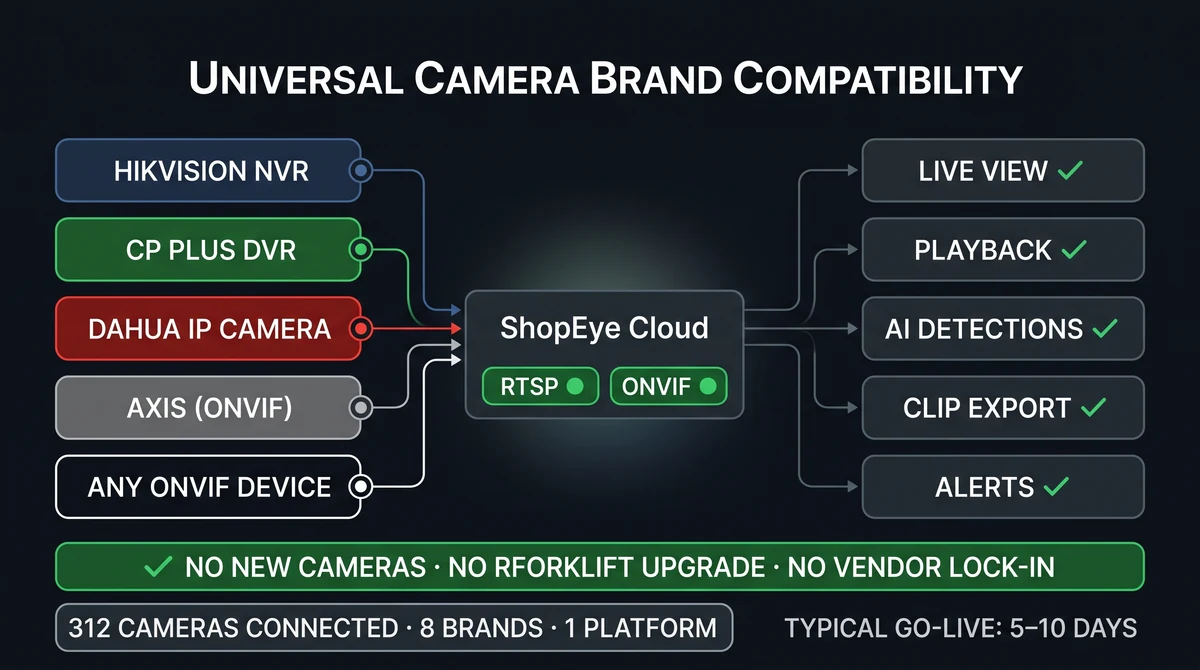
Do I need new cameras for Slinai?
No. Slinai connects to existing IP cameras, NVRs, and DVRs using RTSP and ONVIF. Typical deployment connects at the recorder or per-camera stream. Image quality and camera placement affect AI accuracy — we survey sites during onboarding and advise on any repositioning needed.
What Works with existing CCTV delivers
ONVIF & RTSP
Standard protocols — avoid vendor lock-in and integrate the analytics layer on cameras from any manufacturer.
Mixed-vendor sites
Hikvision at one store, CP Plus at another, Dahua at the warehouse — one dashboard for all of them.
Edge & cloud hybrid
Process video locally when bandwidth or data-residency policy requires; push only metadata and alerts to cloud.
Bandwidth-aware streaming
Sub-streams keep analytics running even on limited uplinks; main streams serve live view on demand.
PTZ camera support
Pan-tilt-zoom cameras integrate for guard-tour and patrol views alongside fixed analytic feeds.
Template rollouts
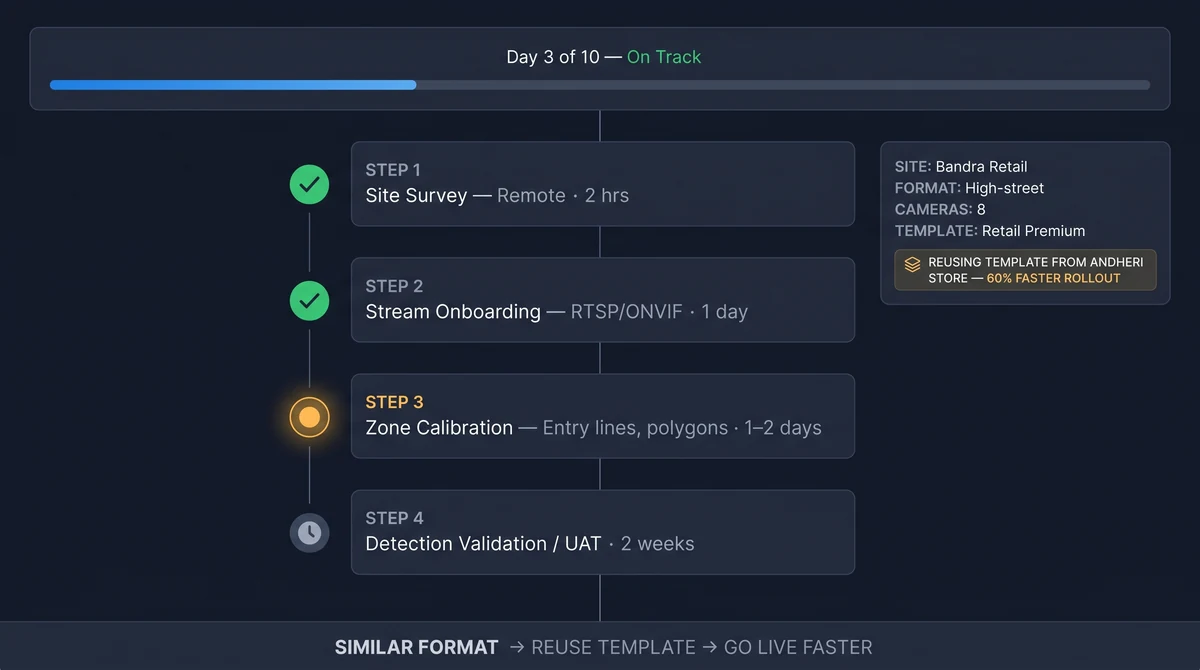
Zone calibration templates from similar-format sites cut onboarding time for subsequent locations by 60–70%.
From connect to insight
Site survey
Identify recorder model, firmware, and stream credentials. Remote surveys are possible for most NVR types.
Stream onboarding
Connect sub-streams to Slinai via RTSP or ONVIF — existing firewall rules rarely require changes.
Zone calibration
Draw counting lines, detection polygons, and entry points per camera view for your industry layout.
Detection validation
Two-week UAT with your ops team before moving to production alerts — similar formats reuse templates.
Typical 5–10 day site connect
Site survey → stream credentials → zone calibration → detection tuning → UAT. Most Indian retail and logistics sites complete in under two weeks. Multi-site rollouts reuse zone templates for similar formats — a standardised store or warehouse layout needs one template, not n individual calibrations.
Slinai supports outbound-only cloud connections in most firewall configurations, avoiding the need for inbound port rules that IT teams typically block.
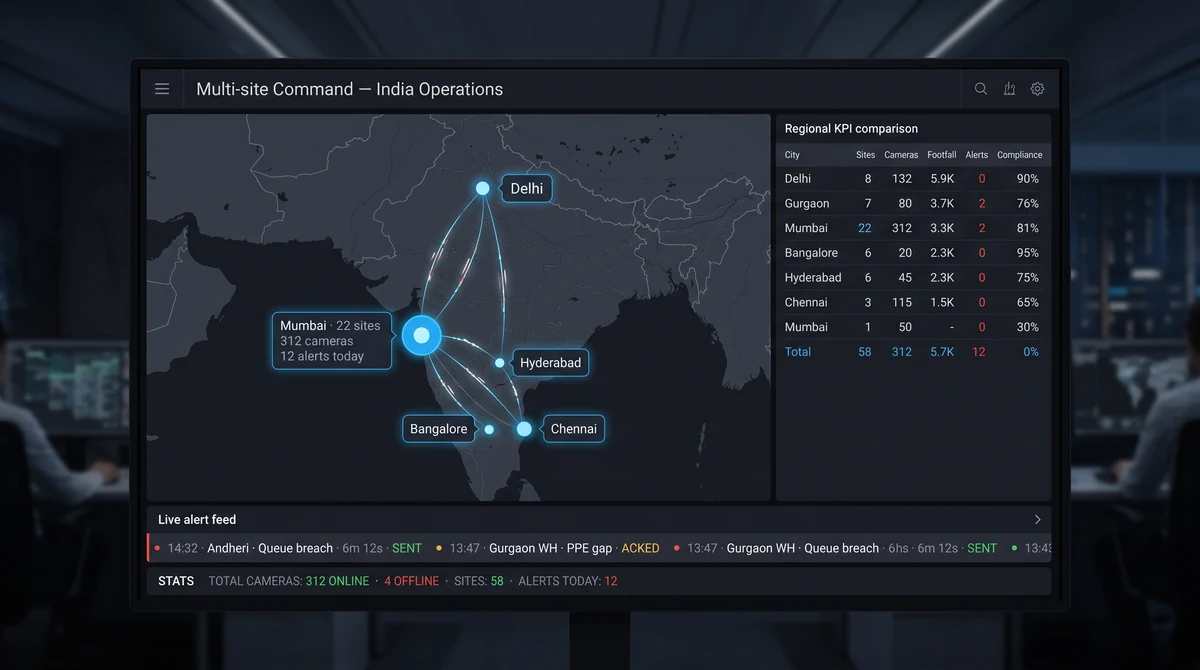
One platform for every camera brand you've ever bought
IT teams managing multi-site estates in India typically inherit cameras from five to ten different vendors and eras. Hikvision at one format, CP Plus at another, Dahua at the warehouse, an Axis unit at HQ — all with different admin UIs and credential schemes. Slinai normalises them through RTSP/ONVIF so one login surfaces every feed.
When new sites are added, onboarding reuses zone templates from similar formats — no per-site AI reconfiguration from scratch.
Explore further
Industries served, use case playbooks, and platform modules that connect with Works with existing CCTV.
Where teams use this
Works best with
See Works with existing CCTV on your cameras
Tell us about your sites and we'll show what Slinai surfaces on the CCTV you already own.
Common questions
Which camera brands are supported?
Any RTSP or ONVIF device — including Hikvision, CP Plus, Dahua, Axis, Bosch, Hanwha, and generic ONVIF NVRs. We verify compatibility during site survey.
Do I need to open ports in my firewall?
Slinai can connect via outbound-only paths in most deployments — discuss your network topology with our implementation team during onboarding.
Do PTZ cameras work?
Yes. PTZ streams integrate for live view and playback; zone-based analytics work on fixed positions or defined home-position frames.
Do analog cameras work?
If your analog cameras are digitised through a DVR or NVR with RTSP output, yes — the same onboarding flow applies.
What bandwidth is required per camera?
Sub-streams often suffice for analytics at 512 kbps to 1 Mbps; live view may use main stream. We help tune per uplink during onboarding.
Talk to us — or see it live
Tell us about your sites and goals, and we'll show you exactly what Slinai surfaces on your existing cameras.
Book a live demo
A focused 30-minute session, tailored to your operation.
- Live walkthrough on footage like yours
- Your top use-cases mapped to detections
- Deployment plan for your cameras & sites
- Indicative pricing and ROI estimate
Or reach us directly