From hours of footage to the exact clip
Motion bookmarks, AI event tags, and zone filters jump investigators to the right moment. Export secure clips with metadata — no USB drives from the back room.
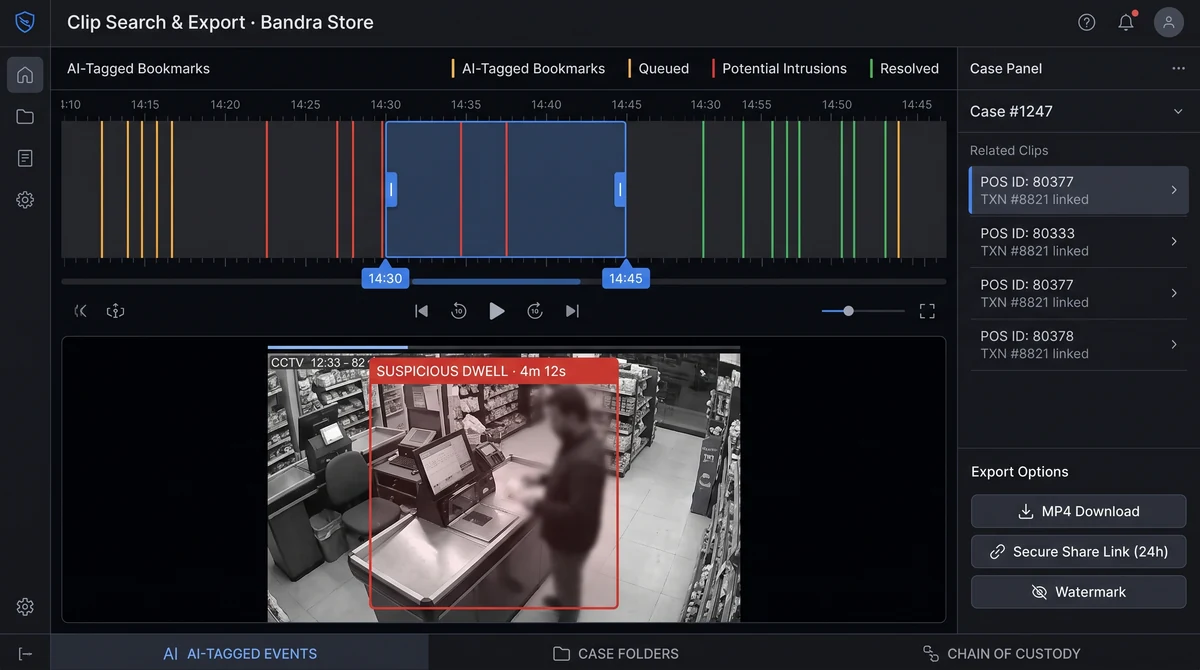
How fast can teams export evidence clips?
Users mark in/out points on the timeline or open a pre-tagged AI alert, preview the segment, and export MP4 or share a time-limited link. Most internal investigations complete in minutes instead of hours of manual NVR scrubbing.
What Clip search & export delivers
AI-tagged bookmarks
Open clips directly from queue, intrusion, or compliance alerts — jump straight to the moment.
Case folders
Group clips, notes, and transaction IDs into LP case files with controlled internal sharing.
Access-controlled sharing
External share links expire; internal shares respect role permissions and audit logs.
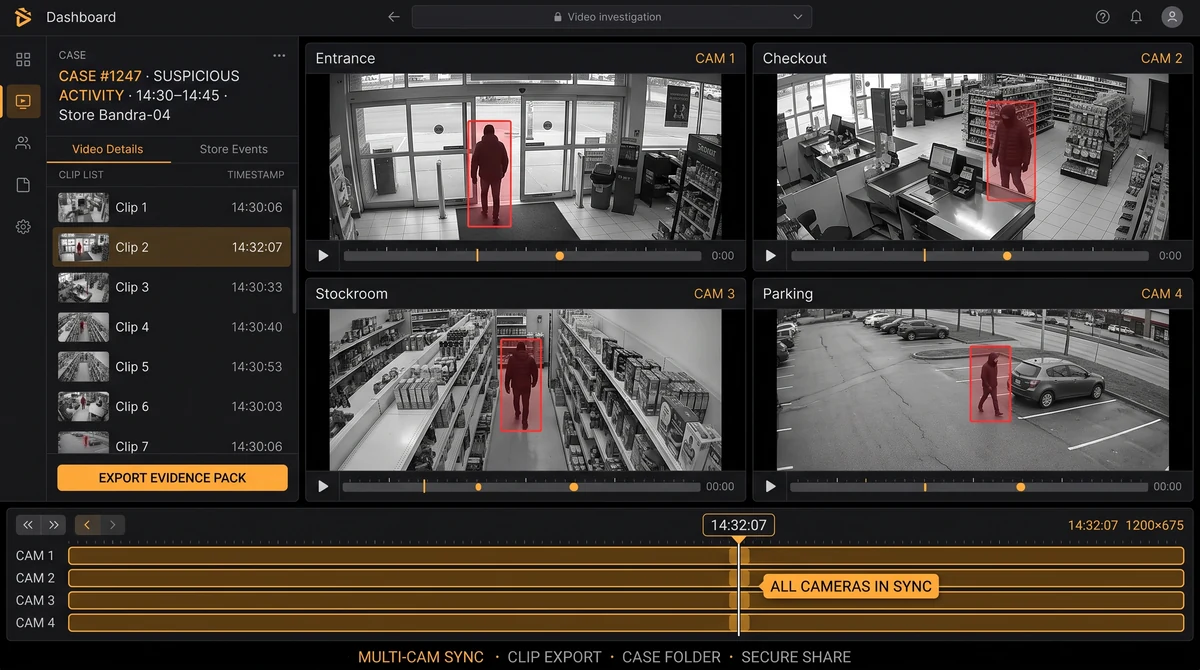
Multi-camera export packs
Bundle entrance, checkout, and stockroom angles into one case export with synced timestamps.
Scheduled evidence retention
Hold specific clips for extended periods independently of the site's standard retention policy.
Zone and event-type search
Filter footage by detection category — queue, intrusion, PPE — before manually scrubbing timelines.
From connect to insight
Open AI-tagged alert
Click a queue, intrusion, or PPE alert to jump directly to the relevant camera segment — no manual scrubbing.
Mark in/out points
Trim to the exact window needed — seconds to minutes around the incident.
Add to case folder
Group clips with notes, POS transaction IDs, and investigator annotations.
Export or share
Download MP4 or generate a time-limited secure link for internal or external recipients.
Build prosecution-ready evidence packs
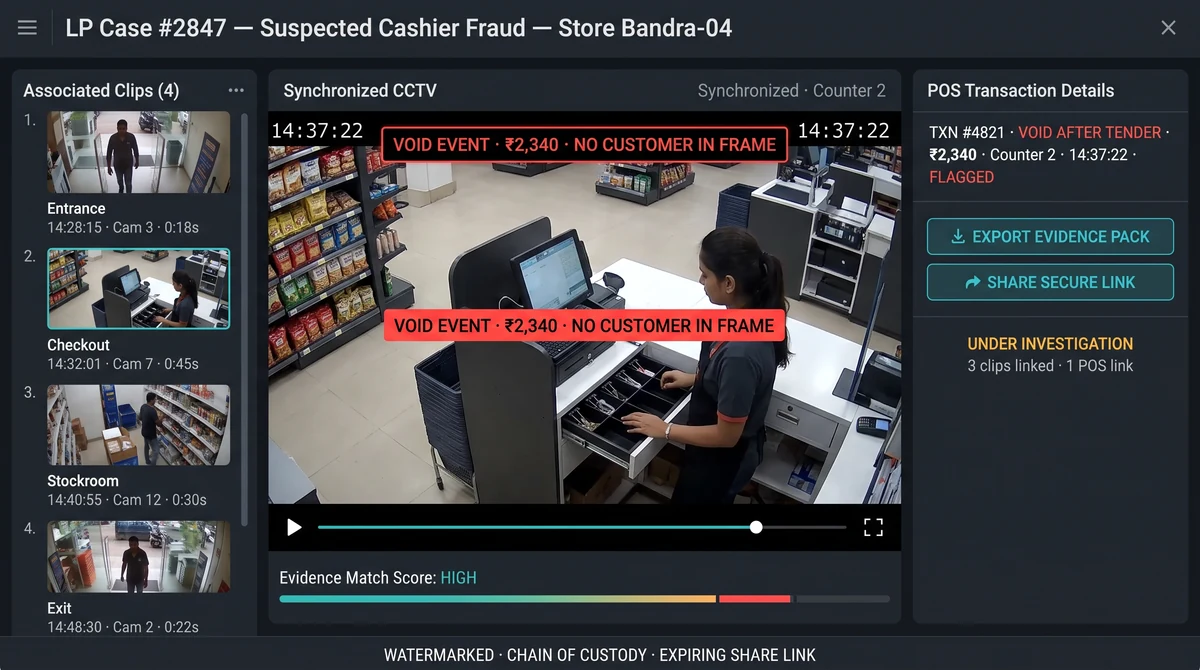
Pair video clips with POS exception data when integrated. LP teams send timestamped, watermarked exports to legal or police with a clear chain of custody — without pulling a USB drive from the NVR room.
See also: POS integrations for transaction-linked investigation workflows and the Loss prevention solution guide.
Evidence for every stakeholder
HR teams need video for disciplinary proceedings. Insurers need timestamped footage for liability claims. Police need watermarked exports with chain-of-custody documentation. Slinai clip exports meet each use case — expiring share links, optional watermarks, and access logs.
Case folders group clips, POS transaction IDs, and investigator notes for a structured handoff to whichever party needs the evidence.
Explore further
Industries served, use case playbooks, and platform modules that connect with Clip search & export.
Where teams use this
Outcome playbooks
Works best with
See Clip search & export on your cameras
Tell us about your sites and we'll show what Slinai surfaces on the CCTV you already own.
Common questions
Can clips be shared with people outside the organisation?
Yes, via expiring secure links. Admins control whether external sharing is permitted per role — links require no platform login from the recipient.
Are exports watermarked?
Optional watermarks with site name, timestamp, and user ID are available for chain-of-custody documentation and legal handoffs.
How long are secure share links valid?
Default is 24–48 hours; admins can shorten TTL for sensitive sites or extend for active investigations.
Can I export multiple camera angles at once?
Yes. Multi-camera export packs bundle synced segments from all relevant angles into a single downloadable archive.
Talk to us — or see it live
Tell us about your sites and goals, and we'll show you exactly what Slinai surfaces on your existing cameras.
Book a live demo
A focused 30-minute session, tailored to your operation.
- Live walkthrough on footage like yours
- Your top use-cases mapped to detections
- Deployment plan for your cameras & sites
- Indicative pricing and ROI estimate
Or reach us directly