Fewer pings. More signal.
Raw motion detection trains teams to ignore alerts. Slinai classifies people, vehicles, and animals — and suppresses weather noise — before a clip leaves the platform.
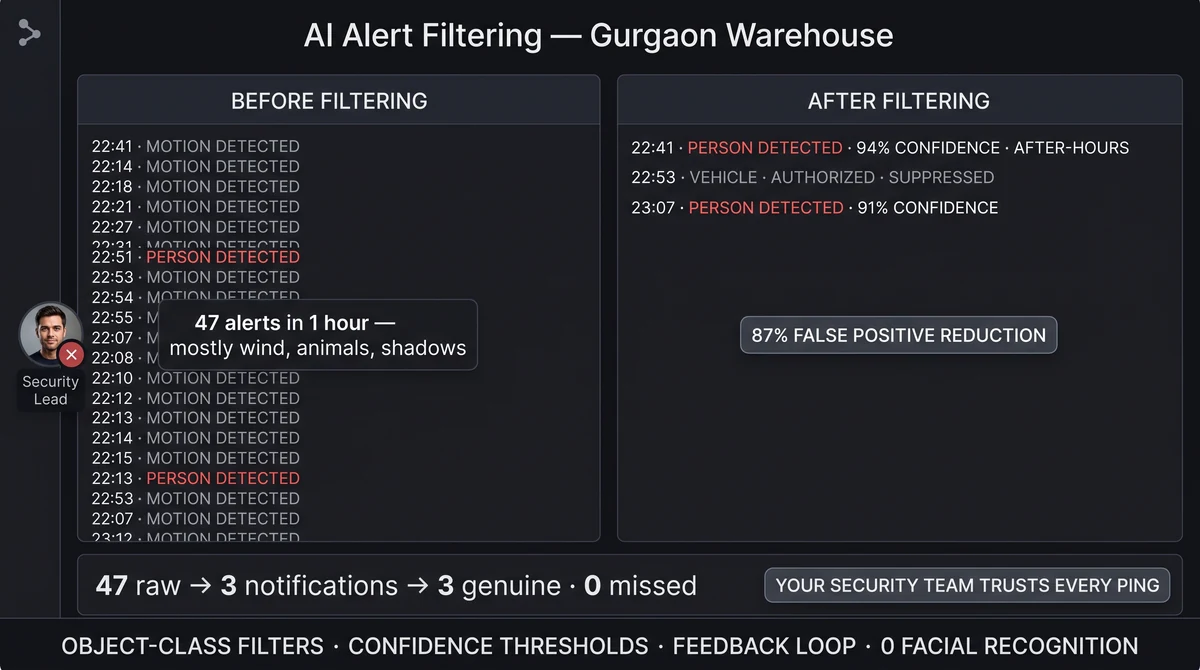
How does AI alert filtering work?
Detections pass through object-class filters, zone context, and schedule rules. Low-confidence or wrong-class events are dropped or batched; high-confidence intrusions generate clips and notifications. Teams tune sensitivity per zone based on dismiss feedback — still without facial recognition.
What AI-filtered alerts delivers
Object-class filters
Alert on people and vehicles; ignore stray dogs, blowing tarps, and weather artefacts where configured.
Confidence thresholds
Set minimum detection scores per zone so only strong, high-confidence events notify on-call contacts.
Dismiss feedback loop
Recipient dismiss reasons feed tuning — fewer repeat false alarms at the same camera over time.
Batch low-priority motion
Optional digests for borderline events instead of midnight phone buzzes — teams review in the morning.
False positive tracking
Per-site false-positive dashboards surface which zones and times generate noise for targeted retuning.
Sensitivity by schedule
Higher sensitivity at night (catch people); lower during business hours to suppress delivery and staff traffic.
Restore trust in after-hours notifications
When every shadow triggers SMS, security mutes the channel and real intrusions slip through. AI filtering is the difference between an ignored alarm stream and a clip your lead opens within seconds.
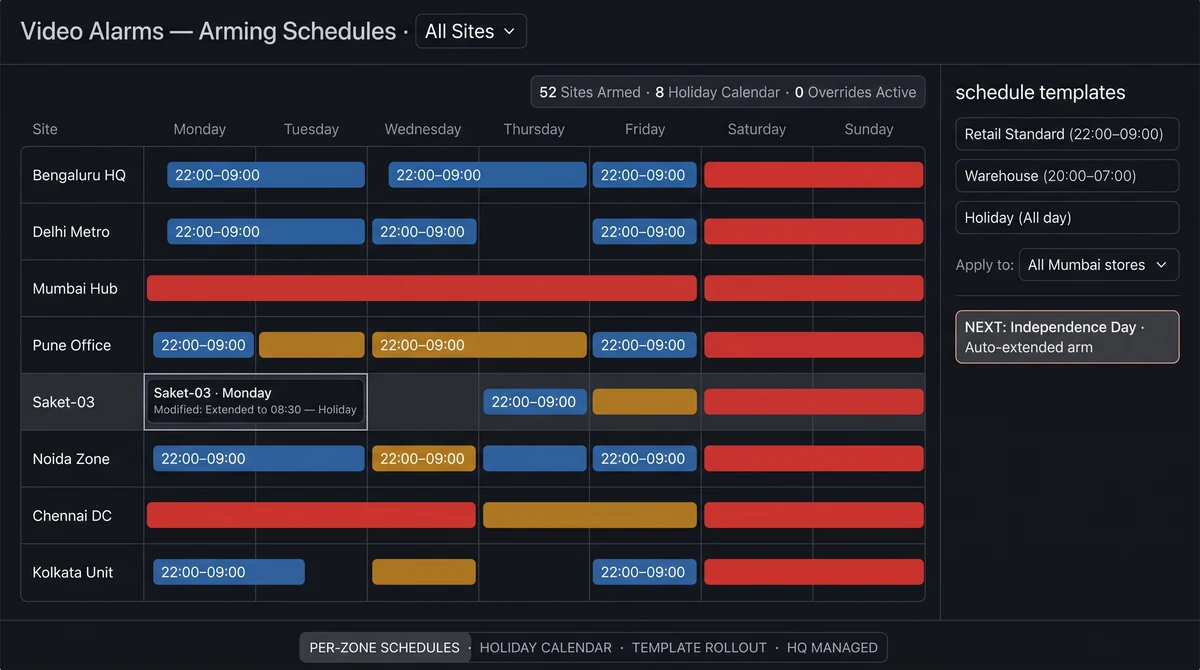
Works with Alert channels to keep WhatsApp reserved for events worth waking someone up for. Partners with Video alarms for full after-hours coverage across retail, logistics, and campus sites.
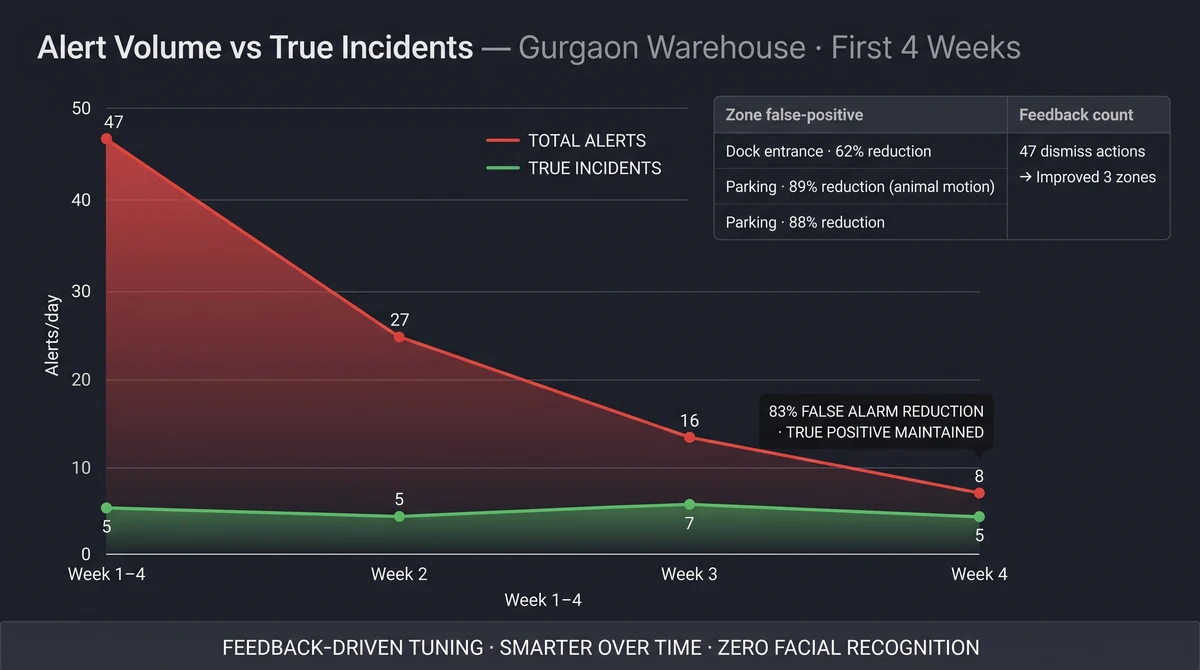
Filtering gets smarter as you use it
Every dismiss feedback trains site-specific models. After 2–4 weeks, most Indian retail and warehouse deployments see 70–85% fewer false alerts at the same zones — without losing genuine intrusion detection. Slinai never shares dismiss data outside your tenant.
Central IT and security can compare false-positive rates across sites to identify cameras needing repositioning or calibration updates — a signal to fix hardware before it creates a blind spot.
Explore further
Industries served, use case playbooks, and platform modules that connect with AI-filtered alerts.
Where teams use this
Outcome playbooks
Works best with
See AI-filtered alerts on your cameras
Tell us about your sites and we'll show what Slinai surfaces on the CCTV you already own.
Common questions
Can we still see suppressed events?
Yes. Filtered events remain in the event log for review — they simply skip instant notification unless you request batch digests.
Does filtering use facial recognition?
No. Filtering uses object class, zone logic, motion patterns, and confidence scores — not identity matching.
How long does tuning take?
Most sites stabilise within one to two weeks of dismiss feedback and zone adjustments during onboarding.
Can we separate people-detection from vehicle alerts?
Yes. Separate object classes route to different alert channels — e.g. vehicle entry to logistics supervisor, person entry to security.
Does filtering degrade detection of actual threats?
Tuning lowers false positive rate while monitoring true positive rate. Our team flags if genuine events are being suppressed during the calibration period.
Talk to us — or see it live
Tell us about your sites and goals, and we'll show you exactly what Slinai surfaces on your existing cameras.
Book a live demo
A focused 30-minute session, tailored to your operation.
- Live walkthrough on footage like yours
- Your top use-cases mapped to detections
- Deployment plan for your cameras & sites
- Indicative pricing and ROI estimate
Or reach us directly