See it. Then decide.
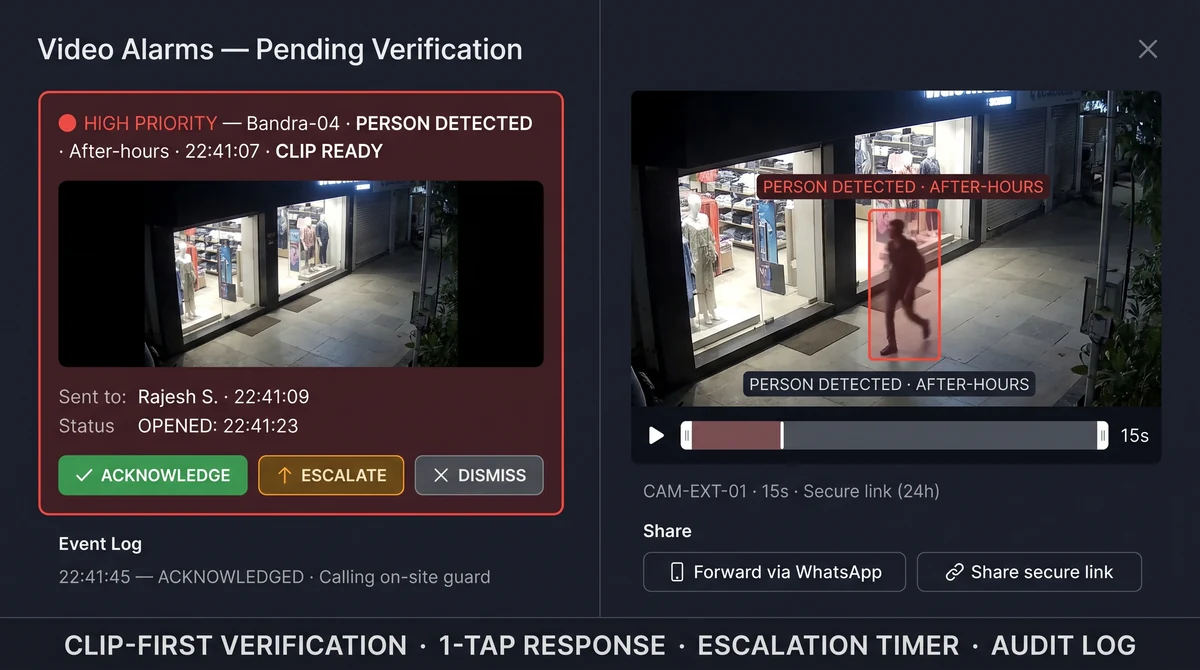
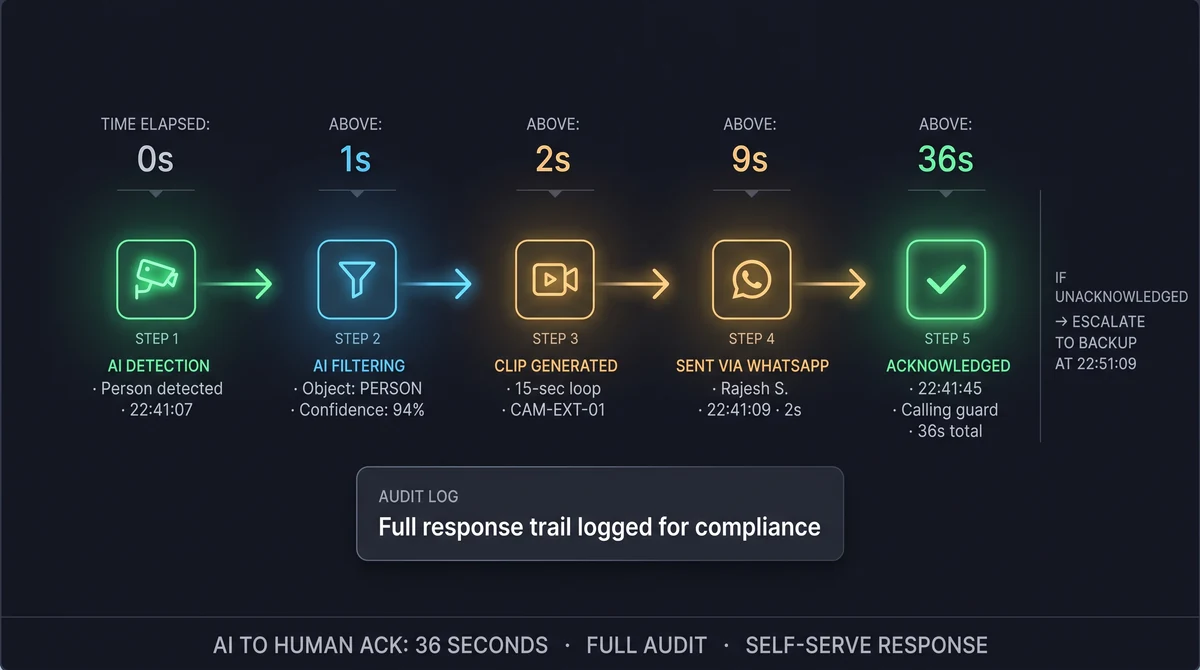
Every intrusion alert ships with a short loop and secure playback link. Your security lead verifies on their phone, acknowledges, forwards to the store manager, or escalates — no outsourced alarm desk in the middle.
What is clip verification?
Clip verification is Slinai's self-serve response workflow: recipients receive a thumbnail and short loop, open full playback if needed, then ack, dismiss with reason, or escalate to another contact. All actions are logged. This replaces the need for a central monitoring station — your organisation retains full control of incident response.
What Clip verification delivers
One-tap playback
Open clips from WhatsApp or SMS without VPN — authenticated links expire for security.
Ack & escalate
First responder acks; unacked critical alerts escalate to backup numbers on a configurable timer.
Response audit log
Full record of who opened the clip, when, and what action they took — for LP and compliance reviews.
Parallel notification
Alert primary and backup contacts simultaneously — first ack holds; useful for sites with variable after-hours cover.
Mobile-first design
Clip verification works on 4G with minimal data use — built for Indian field security teams on budget data plans.
Share to external contacts
Forward time-limited clip links to police, landlord security, or insurer adjusters without giving platform access.
Verification without a monitoring contract
Many Indian operators want after-hours visibility but not a recurring monitoring fee or a third party deciding when to call police. Clip verification puts the loop in your security team's hands — watch five seconds, call the guard, or stand down.
Forward clips internally via WhatsApp or export from Cloud VMS for insurer or police reports when needed.
If nobody acks, the next person knows
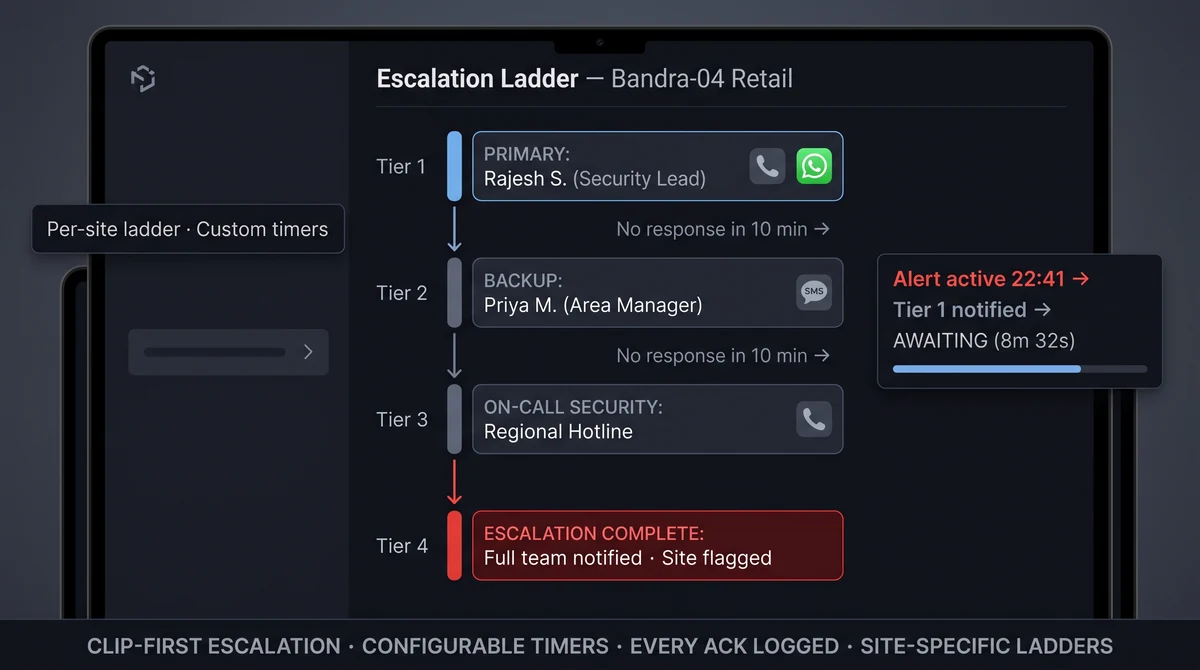
Configure primary and backup contacts per site. Unacknowledged critical alerts escalate to regional security or SMS on-call after a configurable delay — still clip-first, still your roster.
Pair with Alert channels to build multi-tier escalation paths for high-value sites: site → area manager → regional security → on-call director.
Explore further
Industries served, use case playbooks, and platform modules that connect with Clip verification.
Where teams use this
Outcome playbooks
Works best with
See Clip verification on your cameras
Tell us about your sites and we'll show what Slinai surfaces on the CCTV you already own.
Common questions
Is this a replacement for a monitoring station?
It can replace outsourced monitoring if your team handles verification internally. Slinai does not provide professional central monitoring services.
Can multiple people receive the same alert?
Yes. Parallel notification to security lead and store manager; first ack wins or all must confirm per policy.
How long are clip links valid?
Default expiring links balance convenience and security; admins can shorten TTL for sensitive sites or extend for active investigations.
Can we set who receives what type of alert?
Yes. Per-event and per-site routing rules in Alert channels determine which contacts receive which detection types.
Is verification required before escalation?
Optional. Sites can configure mandatory clip-view before escalation, or allow direct escalation for high-severity zones like cash offices.
Talk to us — or see it live
Tell us about your sites and goals, and we'll show you exactly what Slinai surfaces on your existing cameras.
Book a live demo
A focused 30-minute session, tailored to your operation.
- Live walkthrough on footage like yours
- Your top use-cases mapped to detections
- Deployment plan for your cameras & sites
- Indicative pricing and ROI estimate
Or reach us directly