Restaurant queue management: host stand to takeaway
· Updated · Slinai
Key facts
| Search job | Restaurant queue management — host stand, billing counter, and takeaway wait |
|---|---|
| Unit at the host stand | A party, not a head count |
| Walkaway | Entered the waiting area, left by the door without being seated |
| QSR counters | Order wait and pickup wait are timed separately; POS order time joins the second clock |
| Not this post | Aggregator rider shelf, a table waiting for its bill, or retail checkout lines |
A full foyer at 8:40 pm looks like demand. Some of it is demand that is about to leave.
Restaurant queue management is the job of timing the lines guests actually stand in, and acting while they are still standing in them. Slinai does it on existing CCTV with video AI. The full restaurant module list is on restaurant & QSR video analytics. This guide is only the queues.
The method is the same as retail queue analytics: a zone, a count, a timer, an alert. What changes in a restaurant is what you count and when the clock stops.
Three queues, three clocks
| Queue | Who waits | Clock starts | Clock stops | Who acts |
|---|---|---|---|---|
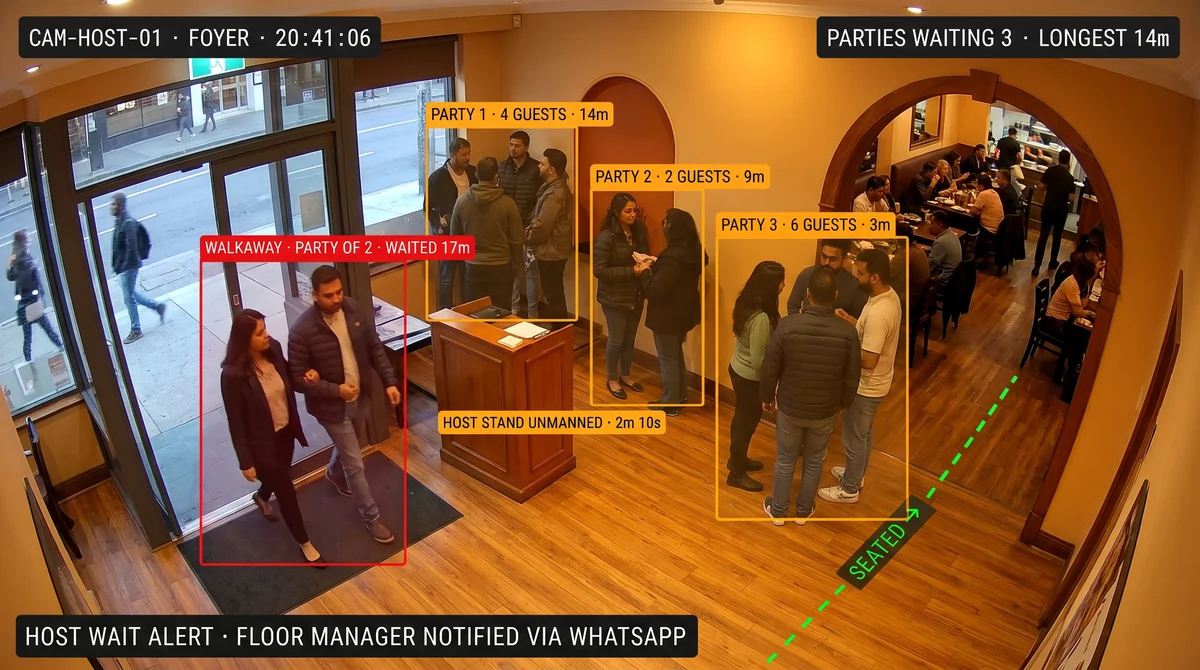
| Host stand | A party | Party enters the waiting area | Party crosses into the dining room, or leaves by the door | Host or floor manager |
| Order / billing counter | A guest | Guest joins the line | Guest reaches the till | Shift lead |
| Takeaway pickup | A paid walk-in guest | Payment at the till (from POS) | Guest collects the bag | Expo or runner |
One “queue length” number for the whole outlet hides which of these is failing. A long order line means too few tills open. A crowded pickup area means the kitchen or the expo is slow. They have different fixes and different owners.

Count parties, not heads, at the host stand
A group of six is one table. Counting heads makes the host queue look three times longer than the number of tables you need.
The host-stand clock is per party:
- Waiting — the party is inside the waiting area.
- Seated — the party crosses the line into the dining room. The clock stops.
- Walkaway — the party leaves through the entry door without being seated. The clock stops, and the wait is logged against a lost table.
A waitlist app records names and quoted waits. It does not record who gave up. The walkaway count by meal period is the number most outlets have never had.
Grouping is approximate when parties stand close together in a small foyer. Treat walkaways as a trend per lunch and dinner service, not an exact headcount for one evening.
QSR counters: order wait and pickup wait are different problems
At a QSR the guest waits twice: once to order and pay, then again to collect.
- Order wait is visible on camera alone: people in the line zone, and how long the oldest one has been there.
- Pickup wait needs the payment time. Slinai takes the order timestamp from the POS through data & integrations and times from payment to collection, instead of guessing who in the crowd has paid.
When order wait is high and pickup wait is low, open a till. When pickup wait is high, the till is fine and the kitchen or expo is not. That split is the whole value of timing them apart.
Keep aggregator riders out of guest wait
Riders waiting for delivery bags stand in the same space as walk-in takeaway guests. If they share a zone, every lunch rush looks like a guest-wait crisis.
Draw the pickup shelf as its own zone with its own SLA. Rider handoff is covered in aggregator pickup handoff analytics. This guide stops at the guest.

A table waiting for its bill is not a queue
In dine-in, “waiting to pay” usually happens at the table. That is a table that cannot be turned, and it belongs to table turn-time analytics.
Only a physical line at a cash or billing desk counts here: guests standing to settle, takeaway guests paying, or a QSR order counter. Billing exceptions at that desk, such as voids and discounts, are a separate job in POS billing fraud on existing CCTV.
Set rules by meal period and send them to someone who can walk
A wait that is normal at 1:15 pm is a problem at 4 pm. Rules should follow the service, not the clock on the wall.
| Example starting rule | Why it is useful | Who gets it |
|---|---|---|
| Longest host-stand party wait above your dinner SLA | Seat, quote, or offer the bar before they leave | Floor manager |
| Host queue growing and host stand unmanned | The line is not the problem; nobody is managing it | Host lead |
| Order line above N guests with one till open | Open a second till | Shift lead |
| Pickup wait since payment above your SLA | Expo or kitchen is behind | Expo |
These are starting points, not benchmarks. Set the numbers from your own first week, then tighten them. Alerts go to WhatsApp with the clip, under service quality & SLA.

Where the camera has to look
- Host stand: one view that sees the entry door, the waiting area, and the dining-room entrance. Without the door, a walkaway looks like a party that vanished. Without the dining entrance, a seated party looks like a walkaway.
- Order counter: from above and behind the till, facing the line, so people are not hidden behind each other.
- Pickup: a view of where walk-in guests stand after paying, separate from the rider shelf.
A ceiling fisheye over the foyer is the most common reason this fails. Models cannot invent a sightline.
What this does not do
- It does not identify guests. Parties are counted and timed; no facial recognition is used by default.
- It does not know why someone left.
- It does not replace the waitlist or the POS. It adds the physical wait those systems cannot see.
Other restaurant jobs on the same cameras: table turn-time, kitchen hygiene and FSSAI, POS billing fraud, and aggregator pickup.
Book a demo with your host-stand or order-counter camera. One evening of footage is enough to see your walkaways.
Common questions
How is a restaurant queue different from a retail checkout queue?
A checkout line is one person per transaction at one till. A restaurant has a party queue at the host stand, a guest queue at the order or billing counter, and a pickup crowd after payment. Each needs its own clock and its own owner.
Does this replace our waitlist or reservation app?
No. The app owns names, party size, and quoted wait. The camera adds what the app never records: who is physically still waiting, how long, and who left without being seated.
Can it tell why a party walked out?
No. It records that a party entered the waiting area and left by the door without crossing into the dining room, and how long they waited. Why they left is a question for the manager reviewing the clip.
Should delivery riders count in the takeaway queue?
No. Riders wait for aggregator bags on a different SLA. Mixing them with walk-in guests inflates guest wait and fires false alerts. Give the pickup shelf its own zone.
Which camera should we connect first?
For dine-in, the camera that sees the entry door, host stand, and dining-room entrance together. For a QSR, the camera facing the order counter line. Start with whichever line the outlet already gets complaints about.
Related pages
Guides in this cluster point to live product, industry and use-case pages.
Related guides
Aggregator pickup handoff analytics for QSR
QSR aggregator pickup analytics times rider handoff, unattended bags and queue overflow on existing CCTV — before platform penalties and cold-food reviews.
Kitchen hygiene and FSSAI video analytics for restaurant chains
Kitchen hygiene and FSSAI video analytics watches hairnets, gloves and wash stations on existing CCTV — evidence between inspections, not a licence replacement.
Restaurant POS billing fraud on existing CCTV
Restaurant POS billing fraud analytics joins voids, discounts and drawer opens to counter CCTV — exceptions the night they happen, not at month-end.